Classes, Objects, Data members, Member functions in JAVA

Hi, I’m Sarthak, a passionate tech enthusiast, a student and blogger. I’m on a mission to share the things that i learn or find interesting.
Hey everyone,
Welcome to the second post in our Java series! Whether you're new to programming or looking to refresh your skills, this series will guide you through Java from the basics to advanced topics. Let's get started!
Prologue
The Java source code file is saved with .java extension and when it is compiled with javac command line tool the byte code with .class extension is being created which will eventually be converted into machine understandable language and then it is ready to be executed.
Classes
“class” is a keyword which is used to create user defined data type (created by programmer to represent a specific set of values), it acts as a blueprint / template for creating objects. Class contains variable (to store data) and functions (that works on data). It is a collection of data members and member function. All code must reside inside a class, even the simplest java program must define a class.
// Syntax for creating a class
// "class" is a keyword and "class_name" is the name of class (datatype)
class class_name{
    // class body (can include data member and member function)
}
First Java Program (Hello world)
// Save the file with "Hello.java"

import java.lang.*; // optional liabrary to be imported, as it has been included automatically

class Hello // "class" is keyword and hello is class name
{
    public static void main(String x[]) //main function, execution starts from here.
    {
        System.out.println("Hello, world"); // Printing statement
    }
}
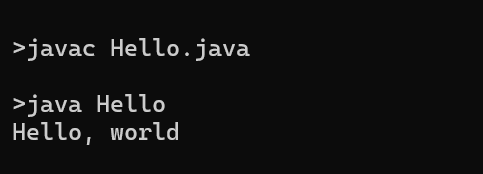
// Now use javac (command line tool to compile) and java to compile and run this program
OUTPUT:
Objects
An object is an instance of a class, that represent data member and member function. It holds the actual data and it provides functionality to that data defined by the class.
Creating an object in java
Creation of a reference variable
Creation of an actual object
A reference variable in Java holds a reference to the object (not the actual memory address directly). The reference is an abstraction that points to where the object is located in the heap memory (it is a region in the memory where dynamic memory allocation takes place).
The reference variable is used to interact with the object, allowing access to its data members (fields) and member functions (methods). As we can not directly access object in java, we need reference variable. Creating a reference variable is the only way to work on object.
“new” keyword (operator) allocates memory to an object. new performs dynamic memory allocation (It is a process of allocating memory to objects during runtime). The address of the object which is now being created is assigned to the reference variable.
// Syntax for creating an object in java
ClassName objectName = new ClassName();
// objectName is the name of refernce variable
// new ClassName(); is the actual object creation statement

// other way of creating an object
ClassName variable_name; // Declaration of reference variable
variable_name = new ClassName(); // Instantiation of the object
Data Members
Data Members (also known as fields or attributes) are the variables defined within a class in OOP (Object Oriented programming). They hold the data that represents the state or properties of the object created from that class.
Think of a data member as a bag that holds the things you put in it. For example, a school bag holds the books you put in it. Likewise, a data member is a container that holds the data assigned to it.
// Syntax for creating data member inside a class
access_specifier data_type variable_name;
// access specifier:  public, private, protected
// data type: int, float, etc.
// Example of data members

class Person{
    int age; // holds the age of a person
    String name; // holds the name of a person
}
Member Function
Member functions (or methods) are defined within a class and operate on the data members of that class. They are responsible for implementing the functionality and defining the behavior of the objects created from the class. Methods require execution through an object instance of the class.
// Syntax for creating member function
// optional: access specifier, parameter list
// required: return type, method name
acccess_specifier return_type method_name(parameter_list)
{
    // method body
}
A member function is invoked / invoked using (.) dot operator or member access operator.
// Example:
    // Member function to display person's details
    void displayDetails() {
        System.out.println("Name: " + name);
        System.out.println("Age: " + age);
    }
// Syntax for invoking member function
object_name.method_name(parameter_list);
//  The parameter list is only included if the member function requires arguments
JAVA program (using objects)
import java.lang.*; // optional liabrary to be imported, as it has been included automatically

class Person{
    int age; // holds the age of a person
    String name; // holds the name of a person

     // Member function to display person's details
    void displayDetails() {
        System.out.println("Name: " + name); // holds the name of the person
        System.out.println("Age: " + age); // holds the age of the person
    }

    public static void main(String x[]) // Main method, execution starts from here
    {
        // Creating the object
        Person p1 = new Person();
        // Storing the data in the object
        p1.name = "Kanye West";
        p1.age = 47;

        // Calling member function for displaying the details
        p1.displayDetails();
    }
}

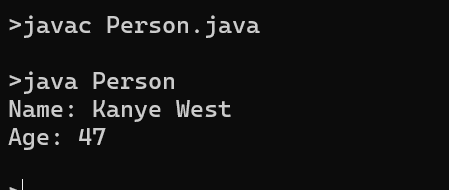
// Now use javac to compile it and then use java to run the byte code
OUTPUT:
What’s next?
So, today we learned about objects, member functions, data members, and classes, and there is much more to come. In the next part, we’ll learn how to handle console input and output.
So, Stay tuned!!
PS: I am also learning Java while teaching it. I believe in continuous growth and am committed to learning as much as I am teaching. If you have any questions, suggestions, or just want to chat about Java, please leave a comment! I'm also new to blogging, so any feedback is appreciated as I strive to improve. Thank you for joining me on this journey! Let's learn and grow together.